
Performance Profiles#
You’ve trained two new model variants and run them across twelve benchmark datasets. Someone on your team opens the results spreadsheet and says: “Same mean score — they’re tied, pick either one.” You look at the per-dataset numbers and something feels off. Model-A dominates on a subset of the tasks and performs significantly worse the other; Model-B is solidly mediocre on every single task. The mean hides the entire story, but performance profiles can give you a more detailed picture.
import warnings
warnings.filterwarnings("ignore")

import numpy as np
import pandas as pd
import tempfile, os

import matplotlib.pyplot as plt

import evaluma
1. The Mean Hides the Shape#
Consider two models evaluated on twelve benchmark datasets.
Specialist scores around 0.90 on six datasets and around 0.50 on the other six.
Consistent scores around 0.70 on every dataset.
Both have a mean score of exactly 0.70.
datasets = [f"D{i:02d}" for i in range(1, 13)]

specialist_scores = np.array(
    [0.91, 0.89, 0.92, 0.88, 0.90, 0.90,   # mean = 0.900
     0.51, 0.49, 0.52, 0.48, 0.50, 0.50]   # mean = 0.500
)
consistent_scores = np.array(
    [0.70, 0.72, 0.68, 0.71, 0.69, 0.70,   # mean = 0.700
     0.70, 0.72, 0.68, 0.71, 0.69, 0.70]
)

print(f"Specialist mean:  {specialist_scores.mean():.3f}")
print(f"Consistent mean:  {consistent_scores.mean():.3f}")
Specialist mean:  0.700
Consistent mean:  0.700
x = np.arange(len(datasets))
width = 0.35
palette = {"Specialist": "#2563EB", "Consistent": "#16A34A"}

fig, ax = plt.subplots(figsize=(9, 4))
ax.bar(x - width / 2, specialist_scores, width, label="Specialist",
       color=palette["Specialist"])
ax.bar(x + width / 2, consistent_scores, width, label="Consistent",
       color=palette["Consistent"])
ax.set_xticks(x)
ax.set_xticklabels(datasets)
ax.set_ylim(0, 1.05)
ax.set_xlabel("Dataset")
ax.set_ylabel("Score")
ax.set_title("Two models with identical mean scores but very different per-dataset distributions")
ax.legend()
plt.tight_layout()
plt.show()
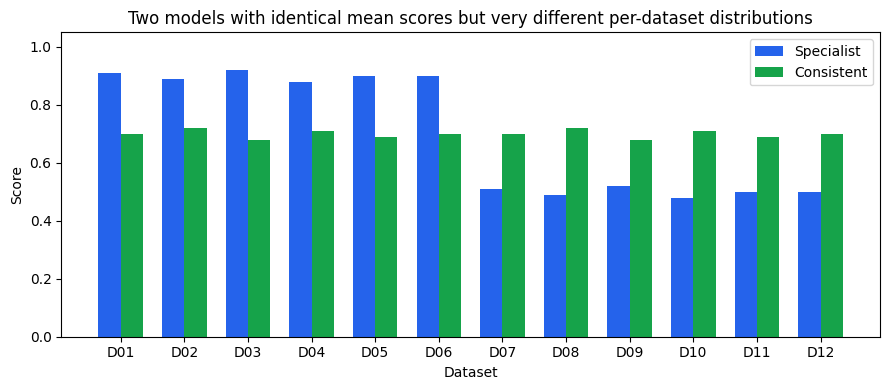
The chart makes the difference obvious, where Specialist excels at half the tasks and fails the other half; Consistent delivers steady, middling performance everywhere. A deployment decision based on mean score alone treats these two models as interchangeable.
pd.DataFrame({
    "Model": ["Specialist", "Consistent"],
    "Mean score": [round(specialist_scores.mean(), 3),
                   round(consistent_scores.mean(), 3)],
}).set_index("Model")
| Mean score | |
|---|---|
| Model | |
| Specialist | 0.7 |
| Consistent | 0.7 |
2. Win Rate: a Better Scalar, Still Incomplete#
Think of win rate as asking: on what fraction of datasets did this model score highest? It is a simple one-liner over the score matrix.
scores_matrix = np.array([specialist_scores, consistent_scores])  # (2, 12)
win_rate = (scores_matrix == scores_matrix.max(axis=0)).mean(axis=1)

for name, wr in zip(["Specialist", "Consistent"], win_rate):
    print(f"{name}: win rate = {wr:.2f}")
Specialist: win rate = 0.50
Consistent: win rate = 0.50
fig, ax = plt.subplots(figsize=(6, 2.5))
ax.barh(["Consistent", "Specialist"], [win_rate[1], win_rate[0]],
        color=[palette["Consistent"], palette["Specialist"]])
ax.set_xlim(0, 1)
ax.set_xlabel("Win rate")
ax.set_title("Win rate is also tied at 0.50 — still no separation between the models")
ax.axvline(0.5, color="#9CA3AF", linestyle="--", linewidth=0.8)
plt.tight_layout()
plt.show()
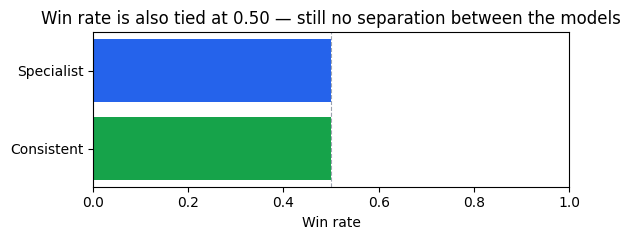
Another tie — 50-50. The six datasets where Specialist scores around 0.50 are exactly the six where Consistent scores 0.70, so Consistent wins those outright, and Specialist wins the other six. Mean score and win rate both declare a draw.
Win rate is a better starting point than mean score in the general case, but it remains a single number: it does not say how far a model falls behind on the datasets it doesn’t win. A model that loses by 0.001 and one that loses by 0.40 have identical win rates.
3. Performance Profiles: the Curve Behind the Number#
The key idea#
Here is the question performance profiles answer: for a given tolerance τ, what fraction of datasets does a model solve within that tolerance of the best score?
Think of it like a leaderboard with a grace margin. At τ = 1.0 (no tolerance) only the outright winner on each dataset gets credit — that is win rate. At τ = 1.2 you also count any model within 20% of the best. As τ grows, more datasets come into each model’s tally. The curve traces how quickly each model accumulates datasets as the tolerance relaxes.
A model that is always close to the best accumulates datasets quickly and reaches 100% at a small τ. A model that bombs badly on some datasets stays flat for a long stretch before those datasets finally fall within tolerance.
The ratio and the curve#
For each model on each dataset, compute a performance ratio — how far the model is from the best score on that dataset:
Here \(s_{kj}\) is the score of model \(k\) on dataset \(j\), and the maximum runs over all models in the comparison. The ratio is always ≥ 1: it equals 1 exactly when the model achieves the best score on that dataset, and grows larger the further behind it falls.
The performance profile \(\rho_i(\tau)\) is the fraction of datasets where model \(i\)’s ratio is at most \(\tau\):
This is the empirical CDF of the ratios across datasets. At \(\tau = 1\), only datasets where the model achieves the best score contribute, so \(\rho_i(1)\) equals win rate exactly.
Note
Two requirements for performance profiles:
All scores must be strictly positive. The ratio \(r_{ij} = \max_k s_{kj} / s_{ij}\) is undefined when \(s_{ij} = 0\).
All scores must be higher-is-better. For metrics where lower is better (e.g., RMSE), flip the ratio: \(r_{ij} = s_{ij} / \min_k s_{kj}\), where \(\min_k s_{kj}\) is the best (lowest) score. Pass
metric_direction={"dataset": "min"}toevaluma.load_csvto handle this automatically.
No normalization to [0, 1] is required — the ratio formula is scale-invariant.
Because evaluma enforces requirement 1 (strictly positive scores), every performance ratio \(r_{ij}\) is finite. This guarantees that every model’s curve reaches ρ = 1 at τ = τ_max — unlike the original Dolan-Moré setting where a solver failure produces an infinite ratio and the curve can asymptote below 1.
The log₁₀(τ) x-axis#
The x-axis is plotted as log₁₀(τ), not τ directly. At τ = 1 (win rate), log₁₀(1) = 0 — the left edge of the plot. At τ = 10 (ten times the best score), log₁₀(10) = 1.
The log scale makes sense because the ratio measures a multiplicative gap. A model that scores 0.90 vs. a best of 0.95 has the same multiplicative gap as one scoring 0.45 vs. 0.475 — both are within a factor of ≈1.056. A linear scale would compress close competitors while stretching models that lag badly. This convention follows Dolan & Moré (2002), extended by the AutoML Decathlon (Roberts et al., 2022) and ML-GYM (Batra et al., 2025).
Plotting the profiles#
def make_bench_from_arrays(model_scores: dict, datasets: list):
    """Build an evaluma Benchmark from {model: scores_array} and dataset names."""
    rows = [
        {"model": model, "dataset": d, "metric": "score", "score": float(s)}
        for model, scores in model_scores.items()
        for d, s in zip(datasets, scores)
    ]
    with tempfile.NamedTemporaryFile(suffix=".csv", delete=False, mode="w") as f:
        pd.DataFrame(rows).to_csv(f, index=False)
        path = f.name
    bench = evaluma.load_csv(
        path,
        model="model", dataset="dataset", metric="metric", score="score",
        norm_ref_low=0.0, norm_ref_high=1.0,
    )
    os.unlink(path)
    return bench
bench_intro = make_bench_from_arrays(
    {"Specialist": specialist_scores, "Consistent": consistent_scores},
    datasets,
)

result_intro = bench_intro.performance_profiles()
result_intro.plot(figsize=(7, 4))
plt.title("Consistent reaches ρ = 1 first despite equal win rate — it never falls far behind")
plt.tight_layout()
plt.show()
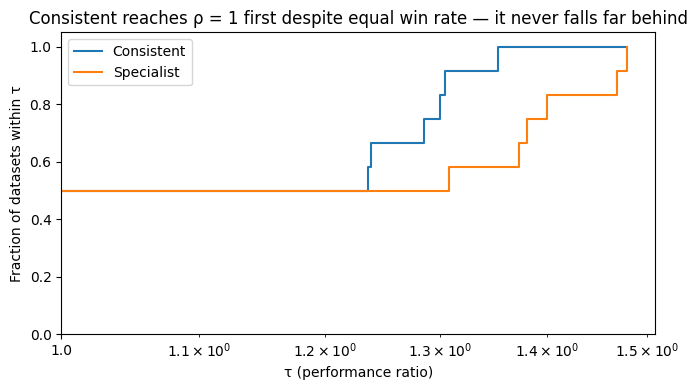
Now the distinction is visible at a glance:
At τ = 1 (left edge): both curves start at ρ = 0.50 — confirming the tied win rate from Section 2.
Consistent rises immediately and steeply, reaching ρ = 1 at log₁₀(τ) ≈ 0.13 (τ ≈ 1.35): on its six losing datasets it scores ≈0.70 against a best of ≈0.90 — never more than ≈35% below the best.
Specialist stays flat at ρ = 0.50 for a stretch, then climbs more slowly, reaching ρ = 1 only at log₁₀(τ) ≈ 0.17 (τ ≈ 1.48): on its six losing datasets it scores ≈0.50 against a best of ≈0.70, a ≈40% gap.
The shape reveals what no scalar can: Specialist has high peak performance; Consistent has low variance. Which matters more depends on your deployment context.
4. Reading the Profile — Three Common Patterns#
Three characteristic patterns appear repeatedly in practice. Recognising them lets you understand what kind of comparison you’re looking at before reaching for any single number.
dsets = [f"ds_{i:02d}" for i in range(1, 16)]

# 1. Dominant: one model above all others on every dataset
rng_dom = np.random.RandomState(42)
dom_scores = {
    "Dom-A": rng_dom.uniform(0.82, 0.96, 15),
    "Dom-B": rng_dom.uniform(0.42, 0.60, 15),
    "Dom-C": rng_dom.uniform(0.22, 0.40, 15),
}

# 2. Crossing: A wins more datasets outright; B is never far from the best
cross_scores = {
    "Cross-A": np.array([0.91, 0.90, 0.92, 0.89, 0.91, 0.88, 0.90, 0.93,
                          0.54, 0.52, 0.55, 0.53, 0.51, 0.54, 0.52]),
    "Cross-B": np.full(15, 0.74),
    "Cross-C": np.full(15, 0.38),
}

# 3. Clustered: all profiles nearly coincide — models are interchangeable
rng_clust = np.random.RandomState(13)
base = rng_clust.uniform(0.65, 0.75, 15)
clust_scores = {
    "Clust-A": np.clip(base + rng_clust.normal(0, 0.01, 15), 0.60, 0.80),
    "Clust-B": np.clip(base + rng_clust.normal(0, 0.01, 15), 0.60, 0.80),
    "Clust-C": np.clip(base + rng_clust.normal(0, 0.01, 15), 0.60, 0.80),
}

bench_dom   = make_bench_from_arrays(dom_scores,   dsets)
bench_cross = make_bench_from_arrays(cross_scores, dsets)
bench_clust = make_bench_from_arrays(clust_scores, dsets)

r_dom   = bench_dom.performance_profiles()
r_cross = bench_cross.performance_profiles()
r_clust = bench_clust.performance_profiles()
fig, axes = plt.subplots(1, 3, figsize=(14, 4), sharey=True)
titles = ["Dominant", "Crossing", "Clustered"]
results = [r_dom, r_cross, r_clust]

for ax, result, title in zip(axes, results, titles):
    result.plot(ax=ax)
    ax.set_title(title)

sub_a = r_cross.table[r_cross.table["model"] == "Cross-A"]
frac_a_at_1 = sub_a[sub_a["tau"] == 1.0]["fraction_within_tau"].values[0]
axes[1].annotate(
    "A wins more\ndatasets outright",
    xy=(1.0, frac_a_at_1), xytext=(1.3, 0.65),
    arrowprops=dict(arrowstyle="->", color="#374151"),
    fontsize=8, color="#374151",
)

plt.suptitle("Three common profile patterns", y=1.02)
plt.tight_layout()
plt.show()
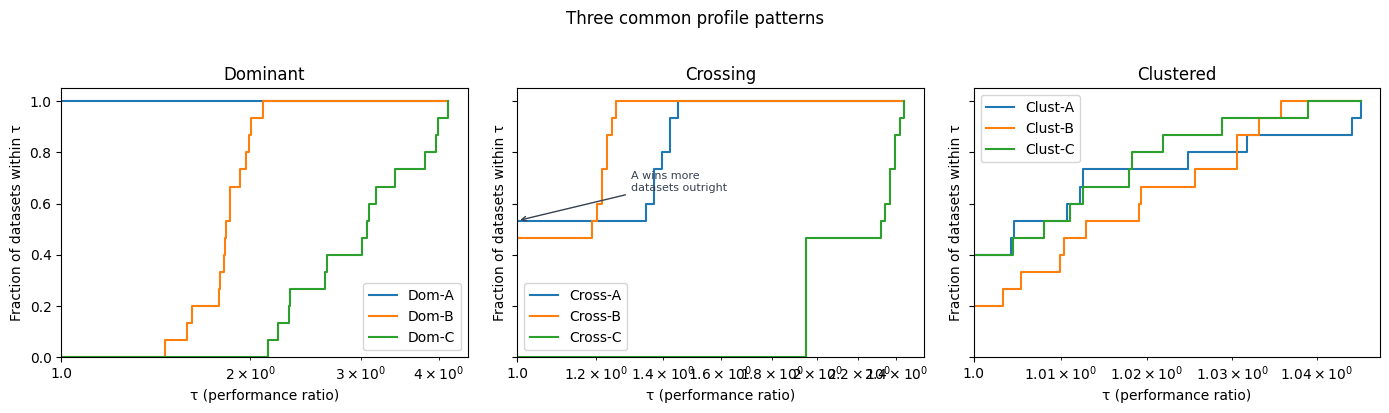
Dominant (left panel): Dom-A’s curve starts high and reaches ρ = 1 well before the others. One model is simply better on every dataset. This is the easiest case — pick that model.
Crossing (centre panel): Cross-A has a higher win rate — it outright wins 8 of 15 datasets, so its curve starts higher at τ = 1. But look at what happens after: its curve flattens, because on the 7 datasets it loses, it scores around 0.52 against a best of 0.74 — a ≈30% gap. Cross-B, with a flat score of 0.74 everywhere, never wins outright but is always competitive. Its curve rises steeply right after τ = 1, crosses A’s, and reaches ρ = 1 first.
No single number captures both dimensions simultaneously. Cross-A has higher peak performance; Cross-B has higher consistency. The profile is the only tool that shows both at once.
Clustered (right panel): All three curves nearly overlap. The models perform similarly across all datasets — no clear winner emerges from this benchmark. This is itself a useful finding: it tells you the choice between models is unlikely to matter much in practice.
Pattern |
What you see |
What it means |
|---|---|---|
Dominant |
One curve starts high and reaches ρ = 1 first |
One model is better on every dataset |
Crossing |
Curves start at different heights and cross |
Peak performance vs. consistency trade-off |
Clustered |
All curves nearly overlap |
Models perform similarly; no clear winner across datasets |
5. Caution: Profiles Depend on Who Is in the Comparison#
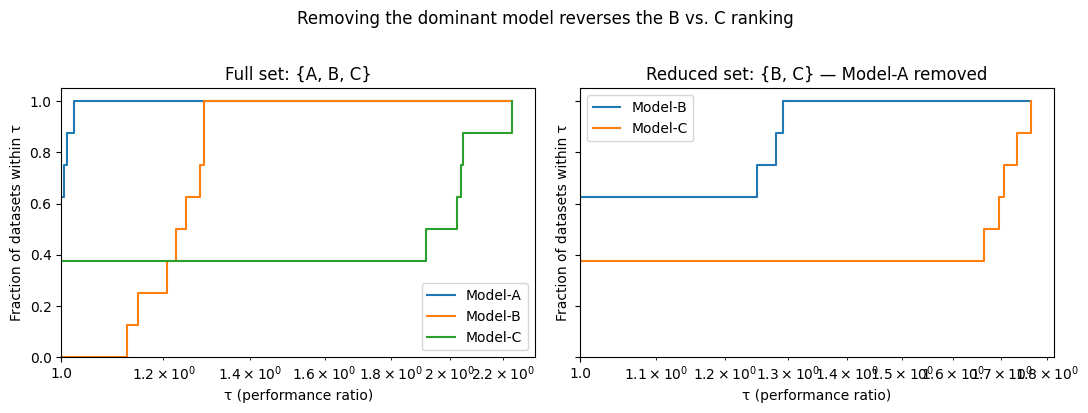
A performance ratio \(r_{ij} = \max_k s_{kj} / s_{ij}\) depends on who else is in the comparison. Remove a dominant model and the best score on each dataset changes, reshaping every other model’s ratios — and potentially reversing the ranking.
This is not a flaw. The profile measures relative competitiveness, not absolute performance. But it means that conclusions about one model depend on which other models are included. Gould & Scott (2016) document this and recommend a stability check: drop the top-ranked model and confirm whether the remaining ordering holds.
We illustrate with three models on eight datasets.
datasets_8 = [f"D{i:02d}" for i in range(1, 9)]

rng_c = np.random.RandomState(3)
caution_scores = {
    "Model-A": rng_c.uniform(0.85, 0.95, 8),          # strongest overall
    "Model-B": rng_c.uniform(0.70, 0.80, 8),           # solid, always below A
    "Model-C": np.array([0.91, 0.93, 0.90,             # beats A on 3 datasets
                          0.44, 0.46, 0.42, 0.45, 0.43]),  # badly lags on 5
}

bench_caution = make_bench_from_arrays(caution_scores, datasets_8)
result_full   = bench_caution.performance_profiles()
bench_without_a = bench_caution.select_models(["Model-B", "Model-C"])
result_without_a = bench_without_a.performance_profiles()
fig, axes = plt.subplots(1, 2, figsize=(11, 4), sharey=True)

result_full.plot(ax=axes[0])
axes[0].set_title("Full set: {A, B, C}")

result_without_a.plot(ax=axes[1])
axes[1].set_title("Reduced set: {B, C} — Model-A removed")

plt.suptitle("Removing the dominant model reverses the B vs. C ranking",
             y=1.02)
plt.tight_layout()
plt.show()
def win_rates(bench):
    sc = bench._raw.values
    wr = (sc == sc.max(axis=0)).mean(axis=1)
    return dict(zip(bench._raw.index, wr.round(3)))

print("Full set win rates:", win_rates(bench_caution))
print()
print("Reduced {B,C} win rates:", win_rates(bench_without_a))
Full set win rates: {'Model-A': np.float64(0.625), 'Model-B': np.float64(0.0), 'Model-C': np.float64(0.375)}

Reduced {B,C} win rates: {'Model-B': np.float64(0.625), 'Model-C': np.float64(0.375)}
In the full set, Model-C occasionally beats the dominant Model-A on 3 of 8 datasets. By win rate the ordering is A > C > B — Model-B looks weakest because it never outright wins anything.
Remove Model-A and watch what happens: the five datasets where A was best now fall to the next-best model. Model-B picks up those five wins and leads 5-to-3. The relative ranking of B and C reverses — from C > B to B > C — purely because the benchmark lost its dominant model.
Warning
Run a stability check whenever you draw conclusions from profiles. Drop the top-ranked model and confirm whether the remaining ordering holds. If it reverses, report both views explicitly rather than treating either one as the definitive answer.
6. Applying Profiles to GeoBench#
The sections above built intuition on synthetic data. Here we apply performance profiles to GeoBench — a geospatial remote sensing benchmark with 19 diverse datasets and 14 pretrained backbone models.
Loading the data#
import pandas as pd
import evaluma

df_raw = pd.read_csv("../../results_and_parameters.csv")

full_coverage = (
    df_raw.groupby("backbone")["dataset"]
    .nunique()
    .pipe(lambda s: s[s == 19].index)
    .tolist()
)
df = df_raw[df_raw["backbone"].isin(full_coverage)].copy()

bench = evaluma.load_df(
    df,
    model="backbone",
    dataset="dataset",
    metric="Metric",
    score="test metric",
    seed="Seed",
    norm_ref_low=0.0,
    norm_ref_high=1.0,
    metric_direction={"biomassters": "min"},
)
One dataset — biomassters — uses RMSE (lower is better). Passing metric_direction={"biomassters": "min"} tells performance_profiles() to compute the ratio as \(\text{RMSE}_i / \min_k \text{RMSE}_k\) so the model with the lowest RMSE still has ratio 1, and ratios grow as performance worsens. Note that performance profiles do not require normalizing scores to [0, 1] — the ratio formula is scale-invariant and operates on raw scores directly.
Selecting representative models#
Plotting all 14 profile curves at once produces an unreadable chart. We use a trimmed-mean aggregate ranking to identify the top performers, then select one representative per model family.
We use aggregate_ranking() here as a quick exploratory filter only — it is a point estimate and should not be treated as a definitive ranking.
agg = bench.aggregate_ranking()
agg.table
| model | score | |
|---|---|---|
| 0 | convnext_xlarge_fb_in22k | 0.538544 |
| 1 | convnext_large_fb_in22k | 0.535668 |
| 2 | dinov3_convnext_large | 0.534927 |
| 3 | dinov3_vitl16 | 0.533613 |
| 4 | terramind_v1_large | 0.526602 |
| 5 | clay_v1_base | 0.524408 |
| 6 | satlas_swin_b_sentinel2_si_ms | 0.523115 |
| 7 | dofa_large_patch16_224 | 0.517022 |
| 8 | satlas_swin_b_naip_si_rgb | 0.513132 |
| 9 | prithvi_eo_v2_600_tl | 0.512007 |
| 10 | terramind_v1_base | 0.502035 |
| 11 | prithvi_eo_v2_300_tl | 0.500841 |
| 12 | ssl4eos12_resnet50_sentinel2_all_decur | 0.473397 |
| 13 | resnet50 | 0.468763 |
top_models = [
    "convnext_xlarge_fb_in22k",   # top-ranked overall; ConvNeXt family
    "dinov3_convnext_large",       # DINOv3-pretrained ConvNeXt; different pretraining
    "dinov3_vitl16",               # DINOv3 ViT; different architecture
    "terramind_v1_large",          # Terramind foundation model
    "clay_v1_base",                # Clay geospatial foundation model
    "resnet50",                    # conventional ImageNet baseline
]

bench_top = bench.select_models(top_models)
Profile analysis#
result = bench_top.performance_profiles()
result.plot(figsize=(8, 5))
plt.title("Performance profiles — GeoBench top backbones")
plt.tight_layout()
plt.show()
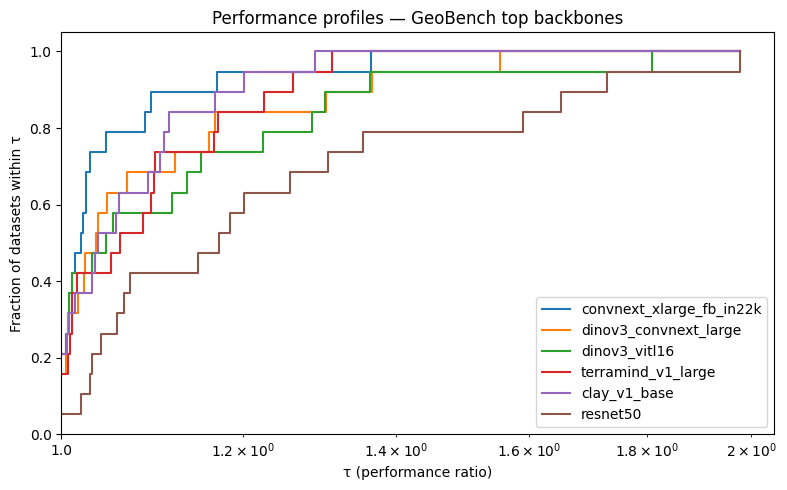
Reading the curves:
Left edge (τ = 1): the y-intercept shows which backbones win datasets outright most often — this is peak performance across tasks.
Slope immediately after τ = 1: a steep rise means the model is always competitive, even on datasets it doesn’t win.
Right tail: a backbone that reaches ρ = 1 late — or has a flat stretch — has at least one dataset where it lags badly relative to the best.
Stability check#
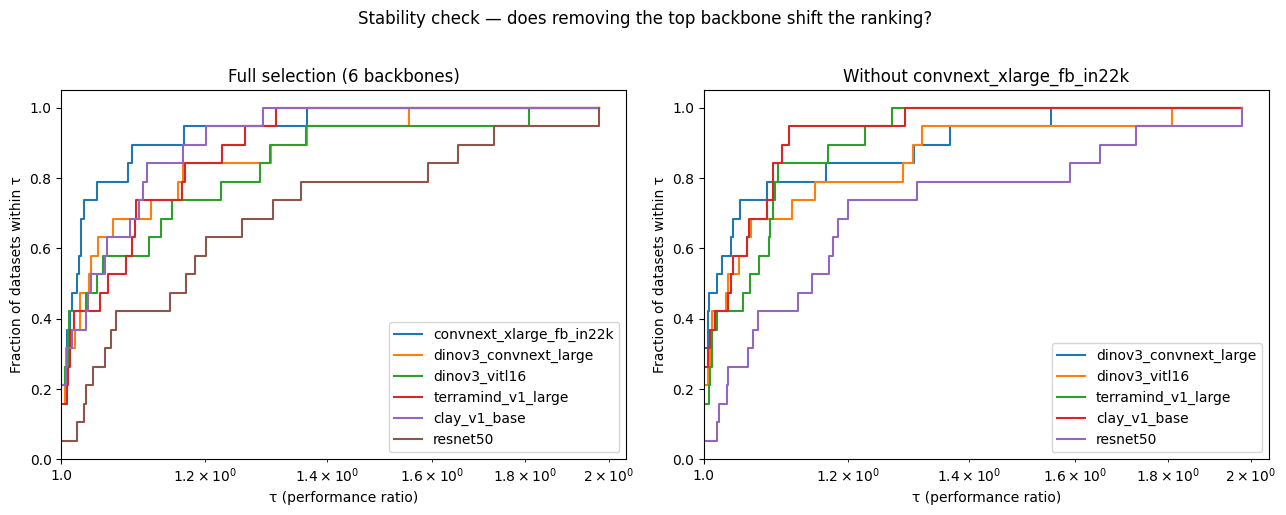
Following the caution in Section 5, we drop the top-ranked backbone and confirm whether the remaining ordering holds.
top_backbone = agg.table.iloc[0]["model"]
remaining = [m for m in top_models if m != top_backbone]

bench_no_top = bench_top.select_models(remaining)
result_no_top = bench_no_top.performance_profiles()

fig, axes = plt.subplots(1, 2, figsize=(13, 5))
result.plot(ax=axes[0])
axes[0].set_title(f"Full selection ({len(top_models)} backbones)")
result_no_top.plot(ax=axes[1])
axes[1].set_title(f"Without {top_backbone}")
plt.suptitle("Stability check — does removing the top backbone shift the ranking?",
             y=1.02)
plt.tight_layout()
plt.show()
def profile_order(result):
    """Return models sorted by win rate (fraction at tau=1), descending."""
    at_1 = result.table[result.table["tau"] == 1.0].copy()
    return at_1.sort_values("fraction_within_tau", ascending=False)["model"].tolist()

print("Full selection order (by win rate):")
print(profile_order(result))

print(f"\nOrder after removing {top_backbone}:")
print(profile_order(result_no_top))
Full selection order (by win rate):
['convnext_xlarge_fb_in22k', 'dinov3_vitl16', 'clay_v1_base', 'dinov3_convnext_large', 'terramind_v1_large', 'resnet50']

Order after removing convnext_xlarge_fb_in22k:
['dinov3_convnext_large', 'clay_v1_base', 'dinov3_vitl16', 'terramind_v1_large', 'resnet50']
If the relative order among the remaining models is unchanged, the profiles are stable. If any pair flips, note the instability explicitly in any report — the top backbone was suppressing ratios on datasets where it dominates, and its removal changes which model looks best on those tasks.
See also
For pairwise probability estimates of “which backbone genuinely outperforms another,” see the Bayesian comparison tutorial.
7. AUP: Collapsing the Curve to a Scalar#
A profile curve is a complete picture, but sometimes you need a single number — for a results table, or to rank ablations. The Area Under the Profile (AUP), introduced by Roberts et al. (2022) in the AutoML Decathlon and subsequently adopted by AlgoPerf (Dahl et al., 2023) and ML-GYM (Batra et al., 2025), provides one by integrating the step function over log₁₀(τ) space:
Each term in the sum is the width of a step in log scale times the height of the profile curve at that step — it is the area enclosed between the curve and the x-axis. A model whose curve rises early and stays high accumulates more area than one that starts high but flattens.
Warning
AUP is not normalized. Its scale depends on τ_max — the largest ratio observed in the run, set by the worst model on the hardest dataset. AUP values are comparable within a single benchmark run but not across runs with different τ_max values. A model’s AUP will appear lower in a more competitive field simply because τ_max is smaller and there is less area to accumulate.
Use AUP as a quick ranking scalar; use the profile curve to understand why a model ranks where it does.
aup = result.aup
aup.sort_values(ascending=False)
convnext_xlarge_fb_in22k    0.276624
clay_v1_base                0.267863
terramind_v1_large          0.260853
dinov3_convnext_large       0.257178
dinov3_vitl16               0.246673
resnet50                    0.205700
dtype: float64
fig, axes = plt.subplots(1, 2, figsize=(12, 4))

result.plot(ax=axes[0])
axes[0].set_title("Performance profiles")

aup_sorted = aup.sort_values(ascending=False)
axes[1].barh(aup_sorted.index[::-1], aup_sorted.values[::-1],
             color=[f"C{i}" for i in range(len(aup_sorted))])
axes[1].set_xlabel("AUP")
axes[1].set_title("AUP ranks models by total area under their curve")
plt.tight_layout()
plt.show()
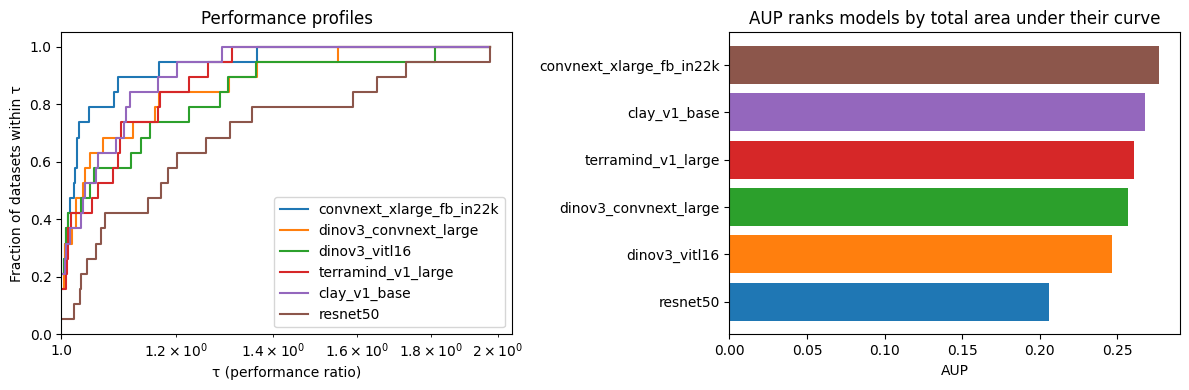
A model with high win rate but a long flat stretch afterward will score lower on AUP than you might expect — that flat region is dead area where it scores no better than the already-accumulated fraction. The AUP ranking rewards models that are both competitive at τ = 1 and stay close to the best across the full τ range.
Summary#
Mean score hides distribution shape. Two models with identical means can have completely different per-dataset profiles — one a specialist, one a generalist.
Win rate improves on mean score but loses information about how far a model falls behind on its losing datasets.
Performance profiles generalise win rate to all tolerance thresholds. The curve reveals both peak performance (left edge) and consistency (slope and crossing behaviour).
Three common patterns: Dominant (clear winner across all datasets), Crossing (peak-vs-consistency trade-off), Clustered (no clear winner; models perform similarly across datasets).
Profiles are relative. Adding or removing a model changes every other model’s ratios. Always run a stability check by dropping the top-ranked model and confirming the remaining ordering holds.
AUP collapses the curve to a scalar — useful for ranking tables, but not comparable across benchmarks with different τ_max values.
References
Dolan, E. D., & Moré, J. J. (2002). Benchmarking optimization software with performance profiles. Mathematical Programming, 91(2), 201–213.
Gould, N. I. M., & Scott, J. (2016). A note on performance profiles for benchmarking software. ACM Transactions on Mathematical Software, 43(2), Article 15.
Roberts et al. (2022). AutoML Decathlon: Diverse Applications and Hard Metafeatures. NeurIPS 2022 Competitions Track.
Dahl et al. (2023). Benchmarking Neural Network Training Algorithms. arXiv:2306.07179.
Batra et al. (2025). ML-GYM: A New Framework for Benchmarking Reinforcement Learning in Scientific Domains. arXiv:2502.14499.